Using Amazon Athena to Troubleshoot AWS ELB Issues

When something goes wrong behind an AWS Elastic Load Balancer (ELB), the first instinct is often to poke around CloudWatch metrics or check target health. That’s useful, but it only tells part of the story.
If you want to understand what actually happened to real requests, ELB access logs are where the truth lives. Combined with Amazon Athena, they become one of the most effective (and underrated) troubleshooting tools in AWS.
This post walks through how to use Athena to inspect ELB logs stored in S3, with a focus on practical debugging, not theory.
Why Athena for ELB logs?
ELB access logs are just text files written to S3. You could download them and grep your way through, but that stops scaling very quickly.
Athena gives you:
- SQL over raw log files
- No infrastructure to manage
- Pay-per-query pricing
- Fast answers to awkward questions
In short: it’s perfect for ad-hoc investigation.
Enabling ELB access logs (quick recap)
Before Athena enters the picture, make sure:
- Access logging is enabled on your Application Load Balancer
- Logs are being written to S3 (for example:
s3://alb-access-logs-<random-value>/AWSLogs/<account-id>/elasticloadbalancing/us-east-1/)
Once logs are landing in S3, Athena can read them directly. No ingestion step required.
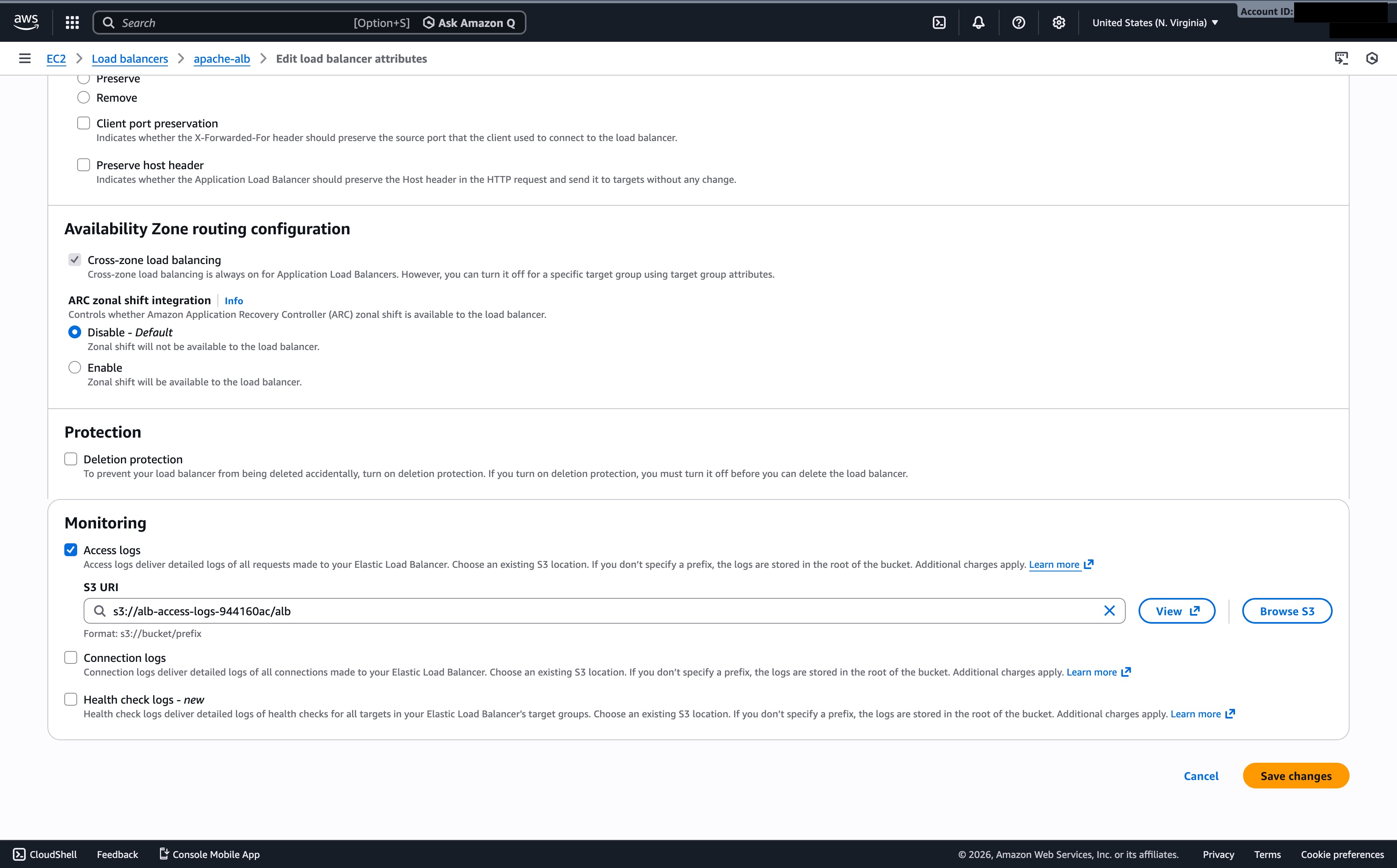
AWS ELB provides two primary logging mechanisms to help you monitor and troubleshoot traffic: Access Logs and Connection Logs. The fundamental difference lies in their focus: Access Logs track Layer 7 (HTTP/HTTPS) request details, while Connection Logs track Layer 4 (TCP/TLS) connection health and handshakes. Given that we are working with an ALB in this instance, we will log the Access Logs to demonstrate how we can glean information from these logs using Amazon Athena.
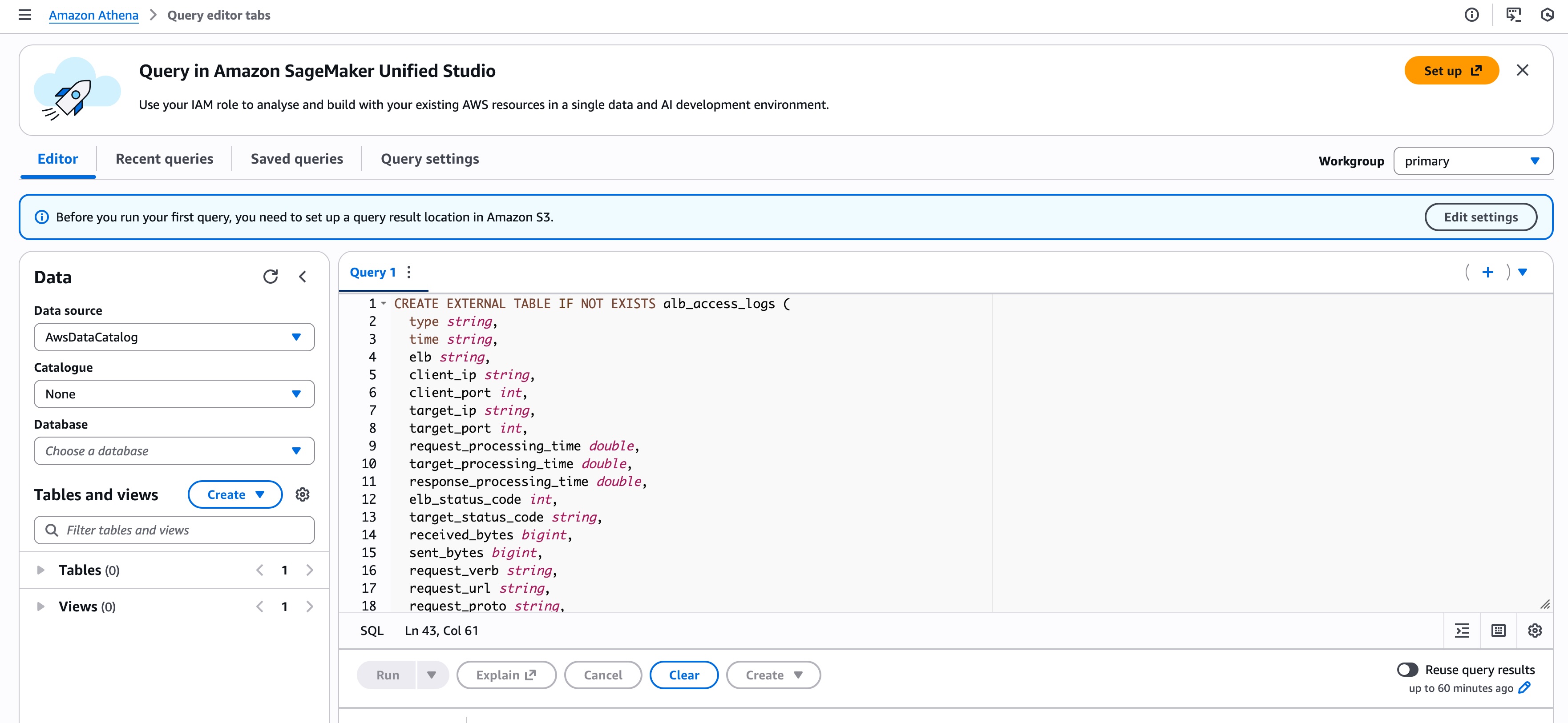
Creating the Athena table
ELB logs are not CSV or JSON, so Athena needs a RegexSerDe to parse them properly.
Below is a table definition that works with modern ALB logs, including newer fields such as conn_trace_id.
CREATE EXTERNAL TABLE IF NOT EXISTS alb_access_logs (
  type string,
  time string,
  elb string,
  client_ip string,
  client_port int,
  target_ip string,
  target_port int,
  request_processing_time double,
  target_processing_time double,
  response_processing_time double,
  elb_status_code int,
  target_status_code string,
  received_bytes bigint,
  sent_bytes bigint,
  request_verb string,
  request_url string,
  request_proto string,
  user_agent string,
  ssl_cipher string,
  ssl_protocol string,
  target_group_arn string,
  trace_id string,
  domain_name string,
  chosen_cert_arn string,
  matched_rule_priority string,
  request_creation_time string,
  actions_executed string,
  redirect_url string,
  lambda_error_reason string,
  target_port_list string,
  target_status_code_list string,
  classification string,
  classification_reason string,
  conn_trace_id string
)
ROW FORMAT SERDE 'org.apache.hadoop.hive.serde2.RegexSerDe'
WITH SERDEPROPERTIES (
  'serialization.format' = '1',
  'input.regex' =
  '([^ ]*) ([^ ]*) ([^ ]*) ([^ ]*):([0-9]*) ([^ ]*)[:-]([0-9]*) ([-.0-9]*) ([-.0-9]*) ([-.0-9]*) (|[-0-9]*) (-|[-0-9]*) ([-0-9]*) ([-0-9]*) "([^ ]*) (.*) (- |[^ ]*)" "([^"]*)" ([A-Z0-9-_]+) ([A-Za-z0-9.-]*) ([^ ]*) "([^"]*)" "([^"]*)" "([^"]*)" ([-.0-9]*) ([^ ]*) "([^"]*)" "([^"]*)" "([^ ]*)" "([^\\s]+?)" "([^\\s]+)" "([^ ]*)" "([^ ]*)" ?([^ ]*)? ?( .*)?'
)
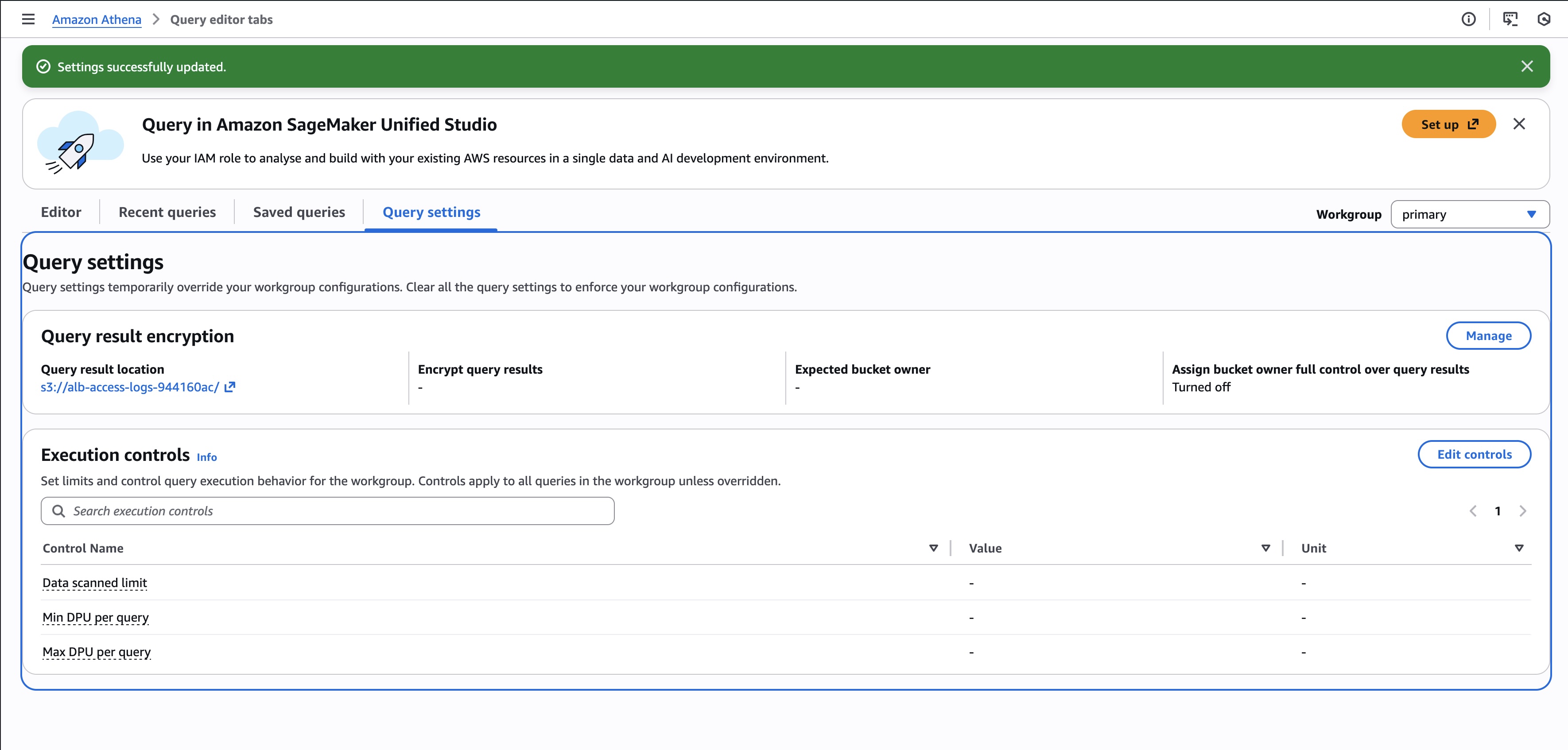
LOCATION 's3://alb-access-logs-<random-value>/alb/AWSLogs/<account-id>/elasticloadbalancing/us-east-1/';
Once this table is created, new logs are picked up automatically. There’s nothing to maintain unless you add partitions later.
Sanity check
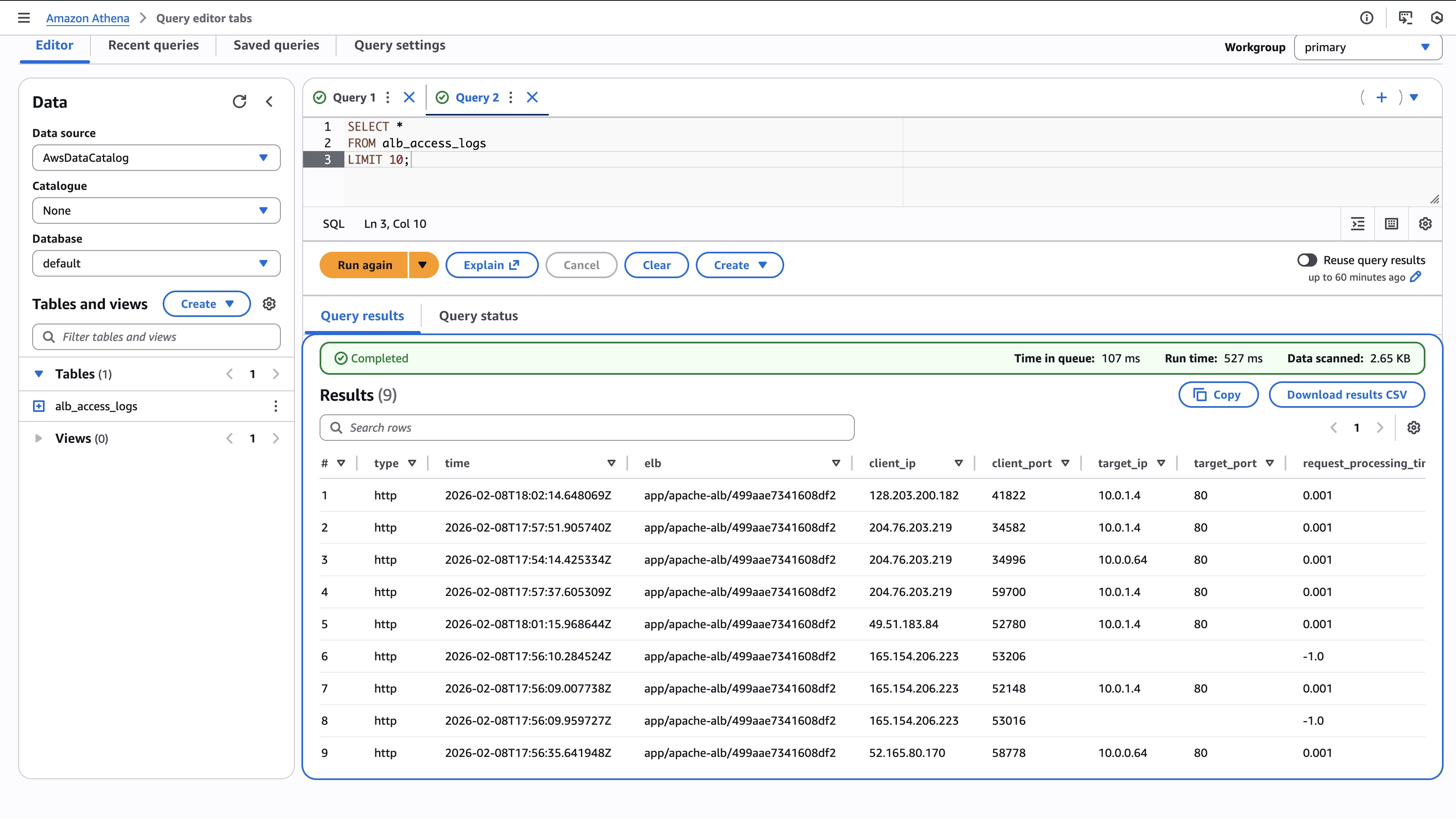
Always start simple:
SELECT *
FROM alb_access_logs
LIMIT 10;
If this returns rows, the regex and S3 path are correct.
Troubleshooting common ELB issues with Athena
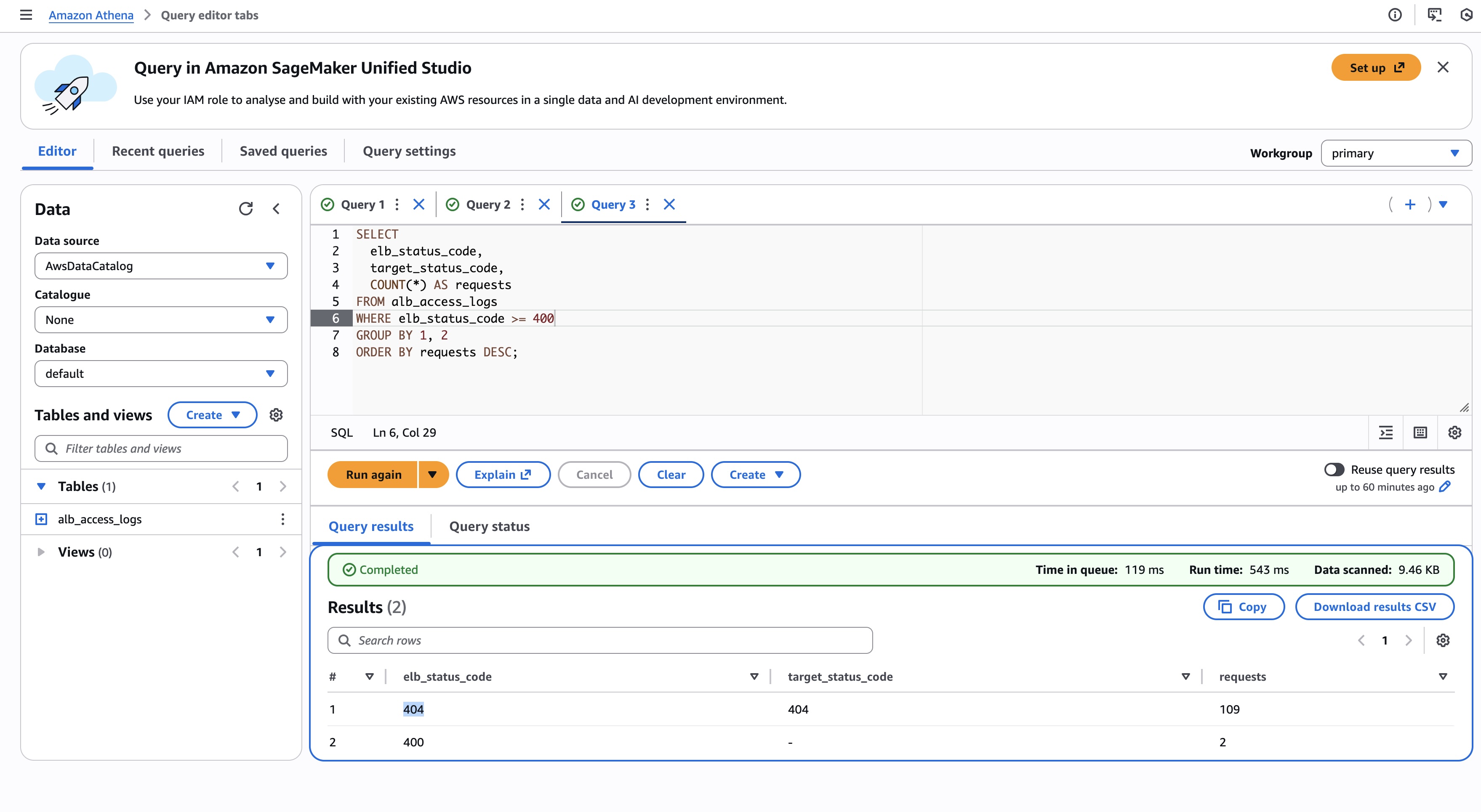
- Why are users seeing 4xx or 5xx errors?
SELECT
  elb_status_code,
  target_status_code,
  COUNT(*) AS requests
FROM alb_access_logs
WHERE elb_status_code >= 400
GROUP BY 1, 2
ORDER BY requests DESC;
This quickly tells you whether:
- The load balancer itself is failing (400,404, 502, 503)
- Or the targets are returning errors (400,404, 500, 504)
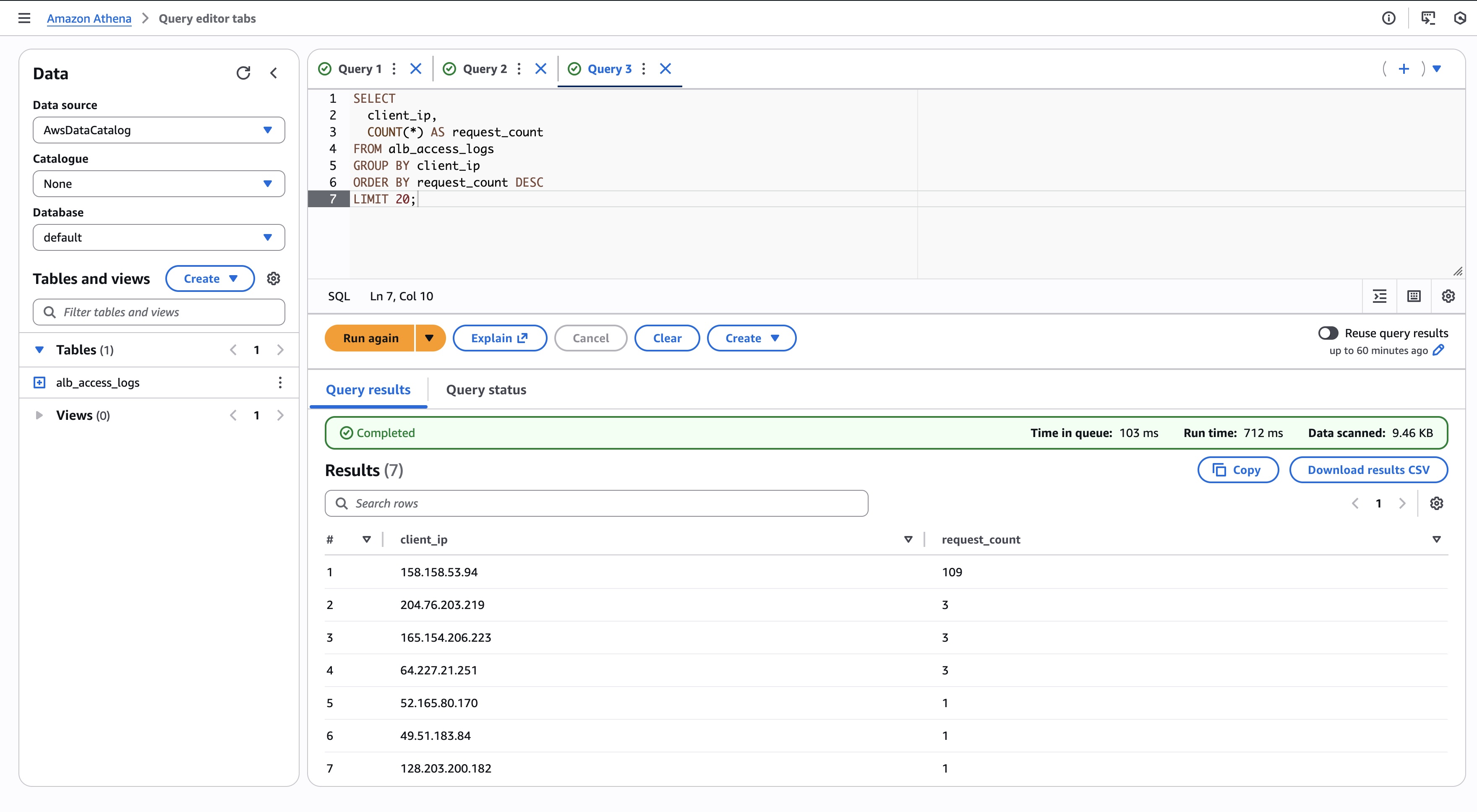
- Which clients are hammering the service?
SELECT
  client_ip,
  COUNT(*) AS request_count
FROM alb_access_logs
GROUP BY client_ip
ORDER BY request_count DESC
LIMIT 20;
Useful for:
- Identifying abusive clients
- Spotting misconfigured crawlers
- Confirming traffic spikes are real
- Are slow requests caused by the backend?
SELECT
  request_url,
  target_processing_time,
  elb_status_code,
  target_status_code
FROM alb_access_logs
WHERE target_processing_time > 1
ORDER BY target_processing_time DESC
LIMIT 50;
If target_processing_time is high, the problem is almost certainly behind the load balancer.
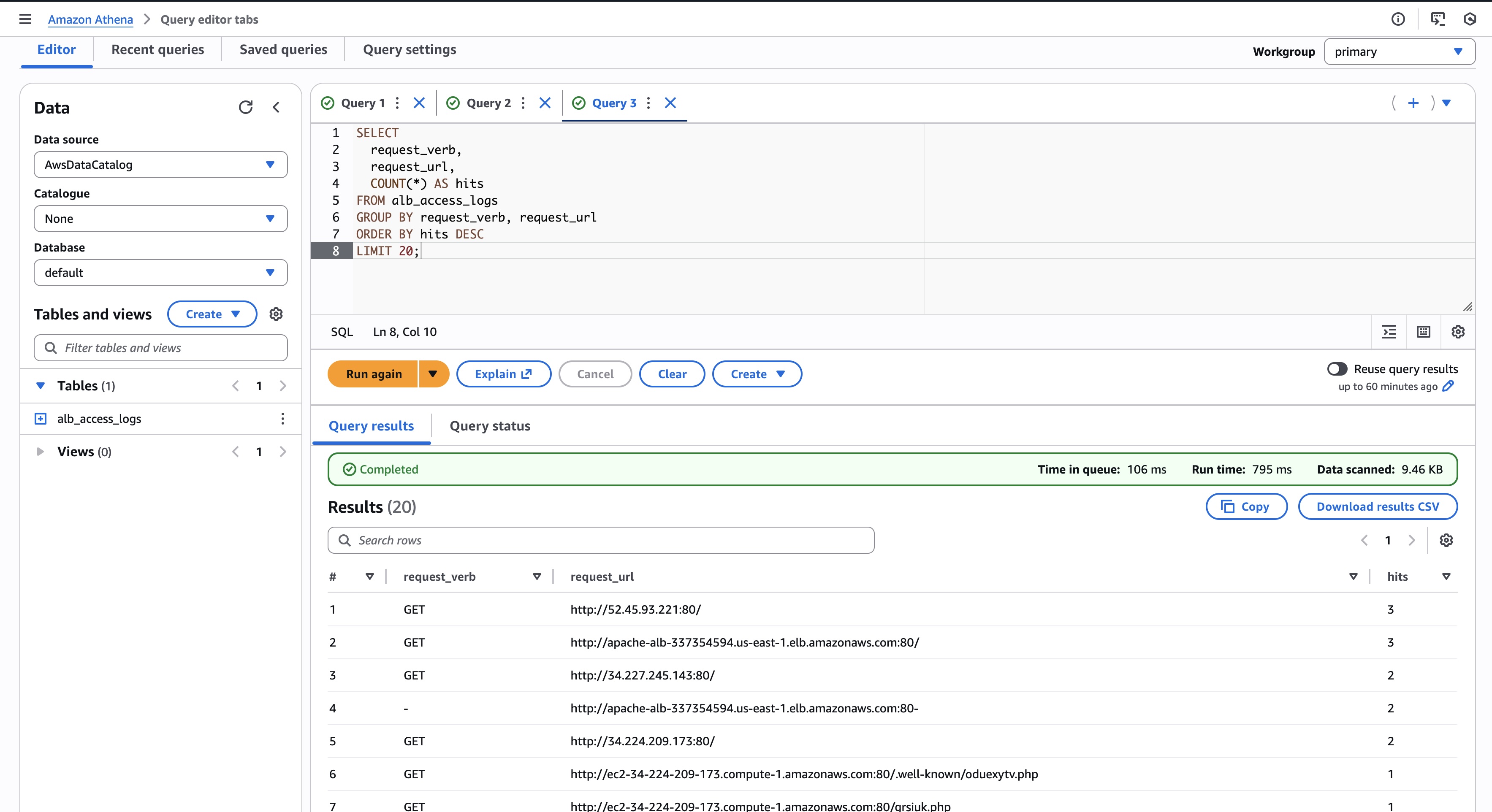
- What are users actually requesting?
SELECT
  request_verb,
  request_url,
  COUNT(*) AS hits
FROM alb_access_logs
GROUP BY request_verb, request_url
ORDER BY hits DESC
LIMIT 20;
This often reveals:
- Unexpected endpoints
- Old clients hitting deprecated paths
- Health checks you forgot about
- When did the problem start?
SELECT
  date_trunc('minute', from_iso8601_timestamp(time)) AS minute,
  COUNT(*) AS requests
FROM alb_access_logs
GROUP BY 1
ORDER BY 1 DESC;
This is invaluable when correlating incidents with:
- Deployments
- Scaling events
- Configuration changes
A note on cost and performance
Athena charges by data scanned. As logs grow, so will query cost.
For production setups:
- Partition logs by year/month/day
- Use partition projection to avoid manual maintenance
You still get the same queries, just faster and cheaper.
Final thoughts
Athena won’t replace metrics or tracing, but it fills a crucial gap: what actually happened to real traffic.
When someone says “the load balancer is broken”, Athena lets you respond with evidence instead of guesswork. And once you’ve used it a few times, it’s hard to go back.
If you already pay for ELB logs in S3, you might as well squeeze every last bit of value out of them.